Favorites
Keep the families, schedules and templates you use most in the Favorites tab, pin the most important ones to the top, and arrange them in your own order.
Fetch pluginRevit 2023–2027Updated
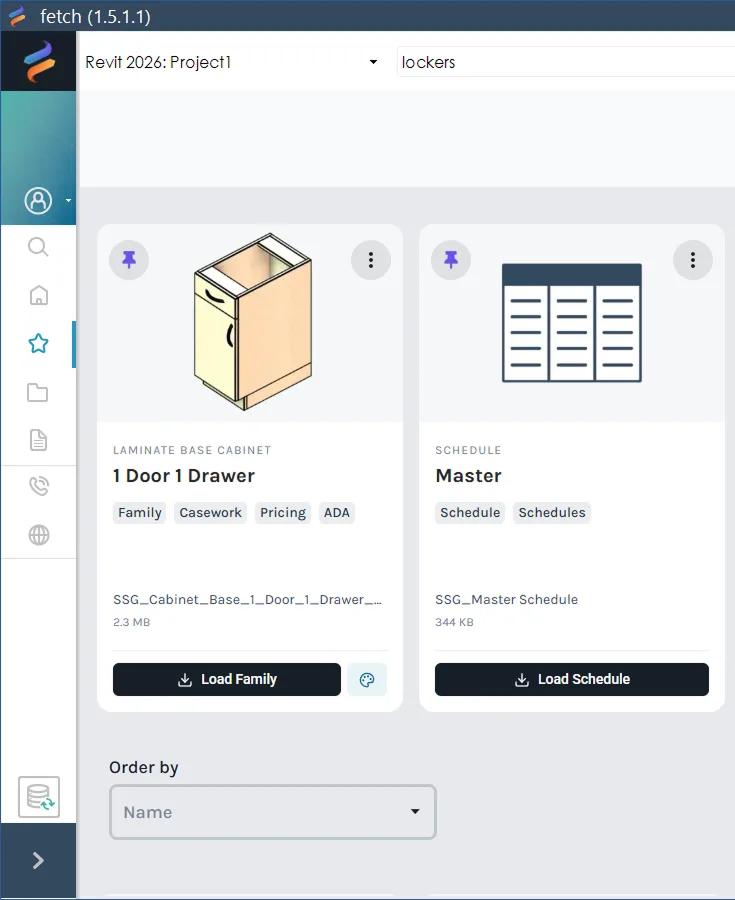
Favorites keep the content you use most one click away. Families, model groups, schedules, tags and project templates can all be favorites. They're saved to your Fetch account, so they follow you to any computer you sign in on.
Add a favorite
Select the heart at the top left of the card. It turns red, and the card appears on the Favorites tab.
Pinned and everything else
The Favorites tab has two sections:
- Pinned, at the top. On the Favorites tab, the heart becomes a pin. Select it to move the card here. Arrange pinned cards in whatever order you like, for example your office's standard casework first.
- Everything else, below. Use Order by to sort by name or by the date you added them.
To unpin a card, select its pin again.
Remove a favorite
Select the red heart on the card again.
Was this page helpful?
Still stuck? Contact the Fetch team and tell us which page you were on.