Documents and specs
Fetch content comes with supporting documents such as CSI specifications, spec guides, finish options, installation guides and Revit material libraries. Here's where to find them.
Fetch pluginRevit 2023–2027Updated
Alongside the files that load into Revit, most Fetch products come with documents you download: specs for your project manual, finish options to share with your client, and material libraries for rendering.
What loads into Revit
- Families (.rfa)
- Model groups (.rvt, or several .rfa files for a dynamic model group)
- Tags (.rfa)
- Schedules (.rvt)
- Project templates (.rvt)
What you can download
- CSI specifications (.doc or .docx)
- Spec guides (.pdf)
- Finish options (.pdf)
- Installation guides (.pdf)
- Sustainability information (.pdf)
- Material libraries (.adsklib)
Download a document
- Open the ⋮ menu on the product's card in the Fetch app.
- Select the document, for example PDF Spec Manual. PDFs open in your browser, and Word documents download to your Downloads folder.
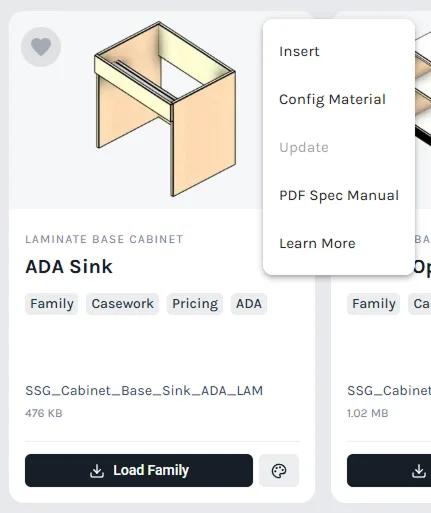
You can also find every document on the product's page on fetchbim.com. Select Learn More at the bottom of the card's menu to go straight there.
Was this page helpful?
Still stuck? Contact the Fetch team and tell us which page you were on.